
Your existing cast/crew keep their access, and any change you make to a role reaches them automatically.
Every cast/crew already has a base role, so changing or removing custom roles won’t leave them without one. Role changes also update automatically for people who are already signed in.
At a glance
| For | Company Administrators |
| Platform | Web Portal |
| Applies to | All regions |
| Time to Read | About 2 minutes |
| You’ll understand | • Why existing cast/crew are never left without a base role. • When role changes take effect. |
Everyone already has a base role
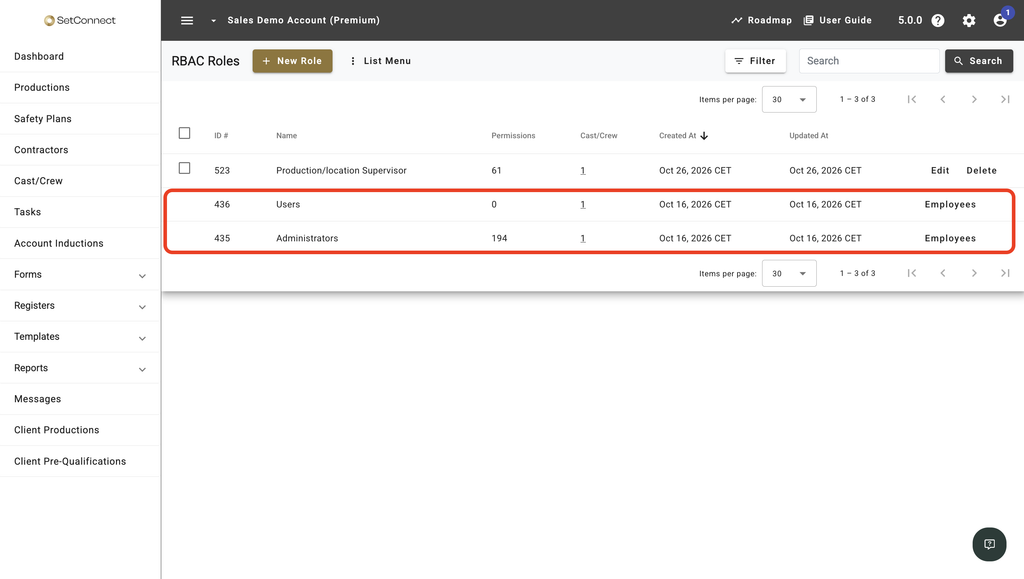
Each person in your account holds either Administrators or Users as their base role, with any custom roles on top. You don’t need to assign the base role yourself.
Changes reach people automatically
When you edit a role’s permissions, everyone who holds it gets the new access the next time SiteConnect updates for them. They don’t need to sign out and back in.
Deleting a role removes the access that role provided from everyone who held it.
You can’t lock everyone out
If you remove Administrators from someone, they move to Users and still keep a base role. SiteConnect also blocks changes that would leave the account without anyone in Administrators or anyone able to edit RBAC Roles.
See How should I plan roles and permissions for my organisation? for more on these safeguards.
Other access cases
Roles belong to one account. If someone works across several accounts in your network, they hold roles in each one separately, so a change in one account doesn’t alter their roles in another.
SiteConnect support staff aren’t affected. They show a single Support chip, and SiteConnect manages their access rather than your account’s roles.
Next recommended step
If someone’s responsibilities change, update or remove their roles to keep their access appropriate.
Next article: How do I assign roles to cast/crew?