
Classify your assets consistently so the Asset Register stays organised as it grows.
Asset Types create broad groups for your assets, while Asset Subtypes add a second level of detail. A consistent structure makes the Asset Register easier to search, filter and maintain.
At a glance
| For | Company administrators |
| Platform | Web Portal |
| Applies to | All regions |
| Time to Read | About 2 minutes |
| You’ll learn how to | • How Asset Types and Subtypes work together. • How to plan a useful classification structure. • How importing and archiving affect your structure. |
How does the hierarchy work?
Every asset must have one Asset Type. You can also assign an Asset Subtype when more detailed classification is useful.
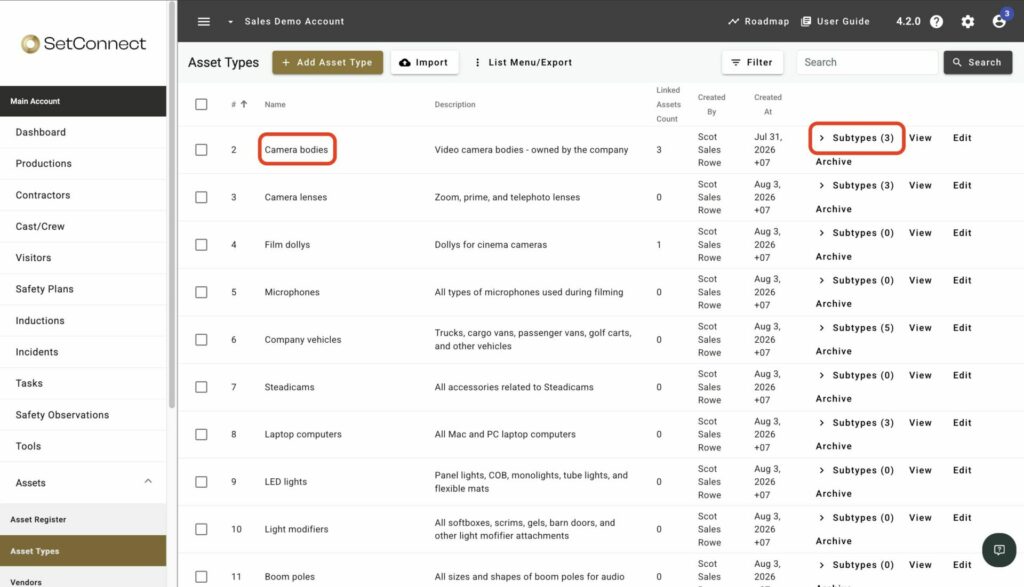
For example:
- Camera bodies: Asset Type.
- IMAX camera body: Asset Subtype.
- Fujifilm GFX Eterna 55: Individual asset.
Asset Type names must be unique across your account. Asset Subtype names must be unique within their parent Asset Type.
How should I structure my asset types?
Start with broad Asset Types that reflect how your organisation groups its vehicles, PPE and equipment. Add subtypes where they help your team find, manage or report on assets more effectively.
Agree the structure and naming convention before adding or importing large numbers of assets. This reduces duplicate classifications and makes the register easier to maintain.
What happens when I import or archive them?
You can create Asset Types and Subtypes individually or import them from a CSV file. If an imported subtype’s parent does not exist, SetConnect creates it automatically.
You cannot archive a type or subtype while it is linked to an asset. Reassign the affected assets first, then archive the classification.